[BETA] LiteLLM Managed Files
- Reuse the same file across different providers.
- Prevent users from seeing files they don't have access to on
listandretrievecalls.
Available with the litellm[proxy] package or any litellm docker image. No Enterprise license is required.
| Property | Value | Comments |
|---|---|---|
| Proxy | ✅ | |
| SDK | ❌ | Requires postgres DB for storing file ids. |
| Available across all providers | ✅ | |
| Supported endpoints | /chat/completions, /batch, /fine_tuning, /responses |
Usage
1. Setup config.yaml
model_list:
    - model_name: "gemini-3.8-flash"
      litellm_params:
        model: vertex_ai/gemini-3.8-flash
        vertex_project: my-project-id
        vertex_location: us-central1
    - model_name: "gpt-6-luna-openai"
      litellm_params:
        model: gpt-6-luna
        api_key: os.environ/OPENAI_API_KEY

general_settings:
  master_key: os.environ/LITELLM_MASTER_KEY  # alternatively use the env var - LITELLM_MASTER_KEY
  database_url: "postgresql://<user>:<password>@<host>:<port>/<dbname>" # alternatively use the env var - DATABASE_URL

litellm_settings:
  require_managed_files: true # optional - reject POST /v1/files without target_model_names
(Optional) Enforce managed files on upload
By default, POST /v1/files falls back to the classic provider file path when target_model_names is omitted. Set require_managed_files: true under litellm_settings to require managed files on every upload.
litellm_settings:
  require_managed_files: true
When enabled, uploads without target_model_names return 400. Existing managed-file behavior is unchanged when target_model_names is provided.
# String (comma-separated for multiple models)
extra_body={"target_model_names": "gpt-6-luna-openai, gemini-3.8-flash"}

# List (OpenAI Python SDK sends this as target_model_names[] in multipart form)
extra_body={"target_model_names": ["gpt-6-luna-openai"]}
2. Start proxy
litellm --config /path/to/config.yaml
3. Test it!
Specify target_model_names to use the same file id across different providers. This is the list of model_names set via config.yaml (or 'public_model_names' on UI).
target_model_names="gpt-6-luna-openai, gemini-3.8-flash" # Specify model_names
Check /v1/models to see the list of available model names for a key.
Store a PDF file
from openai import OpenAI

client = OpenAI(base_url="http://0.0.0.0:4000", api_key="sk-<your-litellm-api-key>", max_retries=0)


# Download and save the PDF locally
url = (
    "https://storage.googleapis.com/cloud-samples-data/generative-ai/pdf/2403.05530.pdf"
)
response = requests.get(url)
response.raise_for_status()

# Save the PDF locally
with open("2403.05530.pdf", "wb") as f:
    f.write(response.content)

file = client.files.create(
    file=open("2403.05530.pdf", "rb"),
    purpose="user_data", # can be any openai 'purpose' value
    extra_body={"target_model_names": "gpt-6-luna-openai, gemini-3.8-flash"}, # Specify model_names
)

print(f"file id={file.id}")
Use the same file id across different providers
- OpenAI
- Vertex AI
completion = client.chat.completions.create(
    model="gpt-6-luna-openai",
    messages=[
        {
            "role": "user",
            "content": [
                {"type": "text", "text": "What is in this recording?"},
                {
                    "type": "file",
                    "file": {
                        "file_id": file.id,
                    },
                },
            ],
        },
    ]
)

print(completion.choices[0].message)
completion = client.chat.completions.create(
    model="gemini-3.8-flash",
    messages=[
        {
            "role": "user",
            "content": [
                {"type": "text", "text": "What is in this recording?"},
                {
                    "type": "file",
                    "file": {
                        "file_id": file.id,
                    },
                },
            ],
        },
    ]
)

print(completion.choices[0].message)
Complete Example
import base64
import requests
from openai import OpenAI

client = OpenAI(base_url="http://0.0.0.0:4000", api_key="sk-<your-litellm-api-key>", max_retries=0)


# Download and save the PDF locally
url = (
    "https://storage.googleapis.com/cloud-samples-data/generative-ai/pdf/2403.05530.pdf"
)
response = requests.get(url)
response.raise_for_status()

# Save the PDF locally
with open("2403.05530.pdf", "wb") as f:
    f.write(response.content)

# Read the local PDF file
file = client.files.create(
    file=open("2403.05530.pdf", "rb"),
    purpose="user_data", # can be any openai 'purpose' value
    extra_body={"target_model_names": "gpt-6-luna-openai, vertex_ai/gemini-3.8-flash"},
)

print(f"file.id: {file.id}") # Unified file id

## GEMINI CALL ###
completion = client.chat.completions.create(
    model="gemini-3.8-flash",
    messages=[
        {
            "role": "user",
            "content": [
                {"type": "text", "text": "What is in this recording?"},
                {
                    "type": "file",
                    "file": {
                        "file_id": file.id,
                    },
                },
            ],
        },
    ]
)

print(completion.choices[0].message)


### OPENAI CALL ###
completion = client.chat.completions.create(
    model="gpt-6-luna-openai",
    messages=[
        {
            "role": "user",
            "content": [
                {"type": "text", "text": "What is in this recording?"},
                {
                    "type": "file",
                    "file": {
                        "file_id": file.id,
                    },
                },
            ],
        },
    ],
)

print(completion.choices[0].message)
File Permissions
Prevent users from seeing files they don't have access to on list and retrieve calls.
1. Setup config.yaml
model_list:
    - model_name: "gpt-6-luna-openai"
      litellm_params:
        model: gpt-6-luna
        api_key: os.environ/OPENAI_API_KEY

general_settings:
  master_key: os.environ/LITELLM_MASTER_KEY  # alternatively use the env var - LITELLM_MASTER_KEY
  database_url: "postgresql://<user>:<password>@<host>:<port>/<dbname>" # alternatively use the env var - DATABASE_URL
2. Start proxy
litellm --config /path/to/config.yaml
3. Issue a key to the user
Let's create a user with the id user_123.
curl -L -X POST 'http://0.0.0.0:4000/user/new' \
-H "Authorization: Bearer $LITELLM_API_KEY" \
-H 'Content-Type: application/json' \
-d '{"models": ["gpt-6-luna-openai"], "user_id": "user_123"}'
Get the key from the response.
{
    "key": "sk-..."
}
4. User creates a file
4a. Create a file
{"messages": [{"role": "system", "content": "Clippy is a factual chatbot that is also sarcastic."}, {"role": "user", "content": "What's the capital of France?"}, {"role": "assistant", "content": "Paris, as if everyone doesn't know that already."}]}
{"messages": [{"role": "system", "content": "Clippy is a factual chatbot that is also sarcastic."}, {"role": "user", "content": "Who wrote 'Romeo and Juliet'?"}, {"role": "assistant", "content": "Oh, just some guy named William Shakespeare. Ever heard of him?"}]}
4b. Upload the file
from openai import OpenAI

client = OpenAI(
    base_url="http://0.0.0.0:4000",
    api_key="sk-...", # Use the key you generated in step 3
    max_retries=0
)

# Upload file
finetuning_input_file = client.files.create(
    file=open("./fine_tuning.jsonl", "rb"), # {"model": "azure-gpt-4o"} <-> {"model": "gpt-4o-my-special-deployment"}
    purpose="fine-tune",
    extra_body={"target_model_names": "gpt-4.1-openai"} # Tells litellm which regions/projects to write the file in.
)
print(finetuning_input_file) # file.id = "litellm_proxy/..." = {"model_name": {"deployment_id": "deployment_file_id"}}
5. User retrieves a file
- User created file
- User did not create file
from openai import OpenAI

... # User created file (3b)

file = client.files.retrieve(
    file_id=finetuning_input_file.id
)

print(file) # File retrieved successfully
from openai import OpenAI

... # User created file (3b)

try:
    file = client.files.retrieve(
        file_id="bGl0ZWxsbV9wcm94eTphcHBsaWNhdGlvbi9vY3RldC1zdHJlYW07dW5pZmllZF9pZCwyYTgzOWIyYS03YzI1LTRiNTUtYTUxYS1lZjdhODljNzZkMzU7dGFyZ2V0X21vZGVsX25hbWVzLGdwdC00by1iYXRjaA"
    )
except Exception as e:
    print(e) # User does not have access to this file
Supported Endpoints
Create a file - /files
from openai import OpenAI

client = OpenAI(base_url="http://0.0.0.0:4000", api_key="sk-<your-litellm-api-key>", max_retries=0)

# Download and save the PDF locally
url = (
    "https://storage.googleapis.com/cloud-samples-data/generative-ai/pdf/2403.05530.pdf"
)
response = requests.get(url)
response.raise_for_status()

# Save the PDF locally
with open("2403.05530.pdf", "wb") as f:
    f.write(response.content)

# Read the local PDF file
file = client.files.create(
    file=open("2403.05530.pdf", "rb"),
    purpose="user_data", # can be any openai 'purpose' value
    extra_body={"target_model_names": "gpt-6-luna-openai, vertex_ai/gemini-3.8-flash"},
)
Retrieve a file - /files/{file_id}
client = OpenAI(base_url="http://0.0.0.0:4000", api_key="sk-<your-litellm-api-key>", max_retries=0)

file = client.files.retrieve(file_id=file.id)
Delete a file - /files/{file_id}/delete
client = OpenAI(base_url="http://0.0.0.0:4000", api_key="sk-<your-litellm-api-key>", max_retries=0)

file = client.files.delete(file_id=file.id)
List files - /files
client = OpenAI(base_url="http://0.0.0.0:4000", api_key="sk-<your-litellm-api-key>", max_retries=0)

files = client.files.list(extra_body={"target_model_names": "gpt-6-luna-openai"})

print(files) # All files user has created
Pre-GA Limitations on List Files:
- No multi-model support: Just 1 model name is supported for now.
- No multi-deployment support: Just 1 deployment of the model is supported for now (e.g. if you have 2 deployments with the
gpt-6-luna-openaipublic model name, it will pick one and return all files on that deployment).
Pre-GA Limitations will be fixed before GA of the Managed Files feature.
FAQ
1. Does LiteLLM store the file?
No, LiteLLM does not store the file. It only stores the file id's in the postgres DB.
2. How does LiteLLM know which file to use for a given file id?
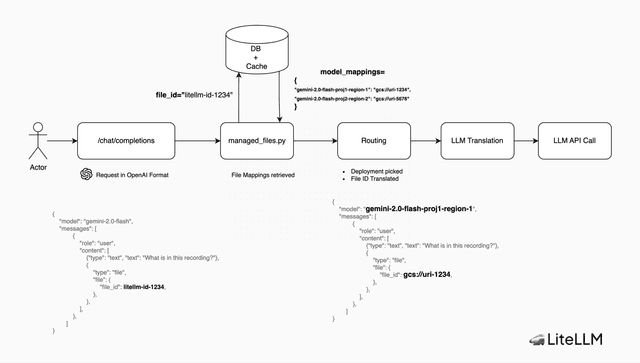
LiteLLM stores a mapping of the litellm file id to the model-specific file id in the postgres DB. When a request comes in, LiteLLM looks up the model-specific file id and uses it in the request to the provider.
3. How do file deletions work?
When a file is deleted, LiteLLM deletes the mapping from the postgres DB, and the files on each provider.
4. Can a user call a file id that was created by another user?
No, as of v1.71.2 users can only view/edit/delete files they have created.
Architecture